Help build the dataset behind a student email assistant — ~15 minutes.
1What this is
Read-only. Nothing is sent, moved, or deleted in your inbox.
You approve every email. You review each one and can remove anything before finishing.
Private. Used only to test triage models — never published or shared.
2Connect an inbox
Personal Gmail, school Outlook, or both.
🎓 School (.edu) sign-in blocked? Paste a token instead
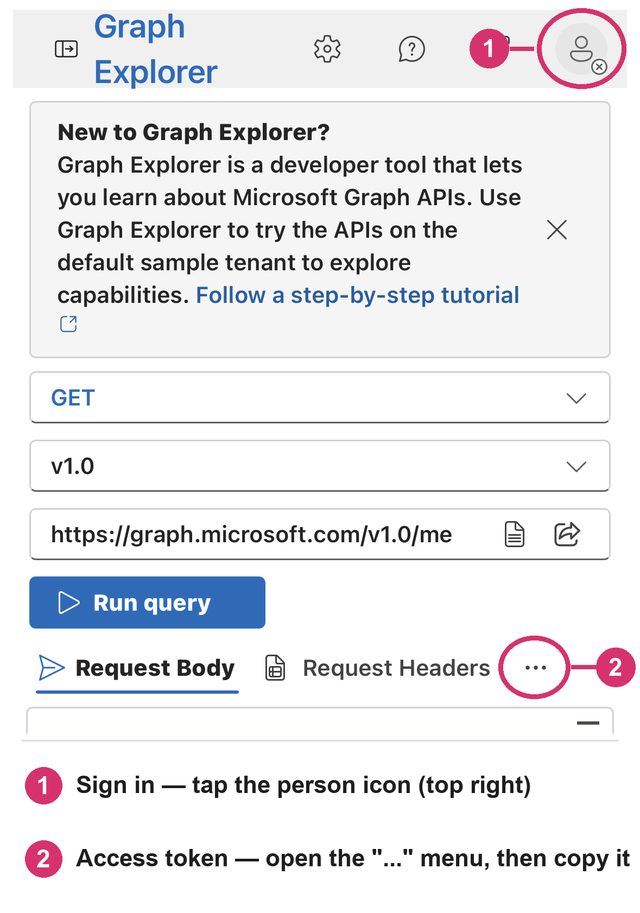
Open Graph Explorer and sign in with your school account (❶ below).
Open the Access token tab (under the ❷ menu on mobile) and copy the token.
Paste it below.
3Sample your emails
We sample emails across the school year, AI will label first, then you review (we recommend ~100 emails).
🏷️ What the labels mean
finance
Money actually moved — a charge, deposit, or refund. Not planned payments or statements.
calendar
Stuff you want or need to attend. If you'd like to hear about it, with the option of adding it to your calendar, put informational.
task
You must do something — submit, pay, sign, register, etc.
informational
Worth knowing, nothing to do.
ignore
Promos, spam, noise — no value to you.
needs reply
Requires a written reply from you, in the inbox.
Fits two? Use this order: money moved → must attend → must do → worth knowing → ignore.
4Review each email
Check the AI's labels, fix anything wrong, confirm. Remove any you'd rather not share.
Nothing to review yet — sample your inbox above.
✓All done — thank you!
Every email is reviewed and your contribution is saved. You can close this tab.
Want to add your other inbox too? Just connect it in step 2 and sample again.